← Back to all browser games
Racing

Drive Mad

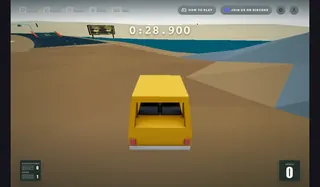
Balance a blocky vehicle over uneven courses in Fancade’s Drive Mad. Short attempts reward careful acceleration and reversing before the truck flips.

Drive Mad — Fancade / poki.com

Prepare to play

Mobile project

Primary · poki.com

Open the game in your browser.

Open the Poki browser edition and allow its game resources to load. Follow the host’s play and privacy prompts; no personal game files are requested. Desktop and mobile browsers are listed by the publisher.

Check the original project’s game-file requirements before starting.

Keyboard · Touchscreen

Touch controls are available.

Check the game’s mobile browser requirements and performance limits.

Original project
Open game siteOpens the original project in a new tab.
0 Historical popularity

Report a problem

Drive Mad

Tell us what happened at this game entry. Reports are saved privately for review.

https://poki.com/en/g/drive-mad

Up to 1,000 characters. Do not include personal information.

Before you play

Balance a blocky vehicle over uneven courses in Fancade’s Drive Mad. Short attempts reward careful acceleration and reversing before the truck flips.

Version note

Fancade · Poki browser edition. Play, privacy choices and progress are handled by the linked host; review its save options before clearing browser data.


How to get started
  1. Start the opening course on Poki and test forward and reverse movement.
  2. Ease off before a steep landing, balance the vehicle and restart the level if it overturns.
Controls

Right arrow drives forward and left arrow reverses. On mobile, hold the on-screen direction arrows. Short presses help control weight and landing.

KeyboardTouchscreen

Questions before you play

Which browser edition does this link open?

Balance a blocky vehicle over uneven courses in Fancade’s Drive Mad. Short attempts reward careful acceleration and reversing before the truck flips.

What do I need before playing?

Open the Poki browser edition and allow its game resources to load. Follow the host’s play and privacy prompts; no personal game files are requested. Desktop and mobile browsers are listed by the publisher.

Where is progress saved?

Fancade · Poki browser edition. Play, privacy choices and progress are handled by the linked host; review its save options before clearing browser data.

Sources & project instructions

Game information & instructions
Drive MadMobile project

Open the game in your browser.

Open the Poki browser edition and allow its game resources to load. Follow the host’s play and privacy prompts; no personal game files are requested. Desktop and mobile browsers are listed by the publisher.

Check the original project’s game-file requirements before starting.

Check requirements
Open game site